Sudoku
An interactive Sudoku app built in C#. Features playable puzzles and full pencil mark support.
Overview & Goals
The requirements behind this project were very straightforward:
- Create a Sudoku web app.
- It must be fast, fluid, responsive, and include all the features Sudoku solvers expect including pencil mark notation and undo/redo functionality.
- No Javascript allowed!
My focus was clean, minimal code with no hacky workarounds, while still delivering a rich, full-featured user experience.
Initial Checks & Guiding Principles
I decided to build this app in C# using the Blazor ecosystem. Before discussing the advantages of Blazor, I think it’s prudent to quickly address requirement #3: no JavaScript allowed. Both Blazor Server and Blazor WebAssembly always run a bit of JavaScript under the hood, so while it cannot be avoided entirely, minimizing it better aligns with the spirit of the Blazor ecosystem.
Another motivation of mine was to modernize an earlier version of this app I had built three years ago, which worked quite well, but from a code perspective, was messy and not maintainable.
Important features:
- Playable puzzles with validation
- Full pencil mark notation support (center and corner pencil marks)
- Undo/Redo functionality
- Clean, responsive design
- Light/dark theme
For the developers:
- C#
- .NET 9
- Blazor Web App (Server & WebAssembly)
- MongoDB, session storage, and local storage
- HTML
- CSS
- Astro
Note: if you are interested in playing any of the puzzles above and would like a truly difficult challenge, I urge you to try Tatooine Sunset by Philip Newman. It is very well constructed but extremely difficult to solve.
Summary
Overall, this project was a success and met all the requirements.
Although the framework uses JavaScript under the hood in a few places via JSInterop, I only invoked this service once in production to trigger a flag informing Astro that the app is ready. Beyond that, I did not write a single line of JavaScript during development.
Please view the repo on GitHub to take a deeper look.
Additional Information
Continue reading to learn more about my process and the challenges I faced.
Architecture & Deployment Notes
The final version is a WASM app/package I published and deployed here on my personal website as an Astro Interactive Island. However, my codebase, which you can find on my GitHub, is still structured as a Blazor web app with both server-side and WebAssembly (WASM) rendering support.
The client side (WASM) handles all interactive gameplay and logic, while the server side, if I choose to use it, renders the component on the frontend and maintains a SignalR connection. When rendered through the server, puzzle data is loaded from MongoDB, but in WebAssembly mode, puzzle data is loaded from a local JSON file embedded within the project for fast, offline-friendly access.
Rather than building a standalone Blazor WebAssembly app from the start, I kept the server-client structure to demonstrate integration with MongoDB and the ability to use different data access methods depending on the rendering mode.
Lastly, publishing and embedding the app into my Astro website makes managing global layout and styling simpler and also offers users a more unified experience.
Note: sometimes WASM apps run slightly slower on Firefox on IOS devices. If you notice a slight lag, try switching to a different browser.
Challenges
Continue reading to learn more about the challenges I faced.
Canvas Element?
Working against the limitations of HTML and CSS proved to be a constant challenge. Using the HTML <canvas> element could have helped at moments, but ultimately would have been overkill considering the requirements of the app.
Border Styling Challenge
The toughest challenge I experienced was implementing the border styling logic, which would visually outline a region of selected cells. Due to the limitations of CSS, this proved trickier than I had first anticipated.
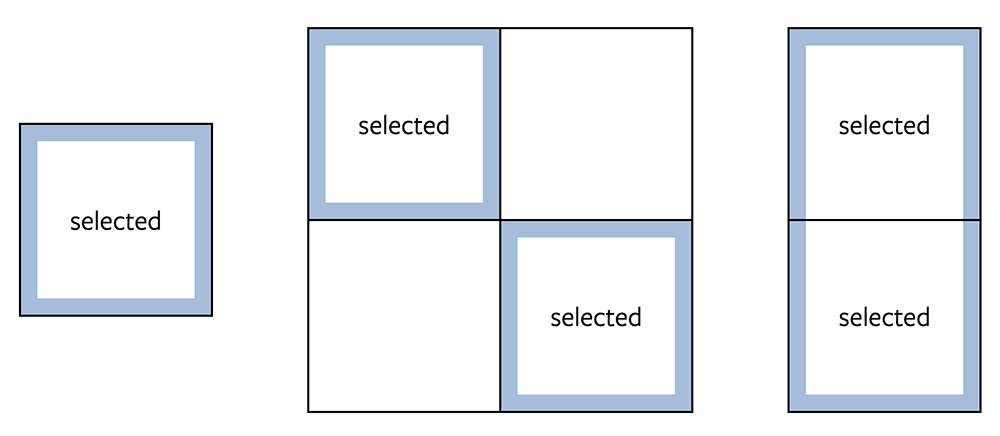
On certain regions, drawing a border is quite simple. A one-cell-large region simply receives a top, right, bottom, and left border (I used box-shadows for a very specific reason I can no longer recall). When cells are orthogonally adjacent, remove the border along their shared edge, thus creating a unified region. See variations below.
However, an issue arises when drawing borders on L-shaped trominos. As you can see, where the edge turns, the outline breaks visually (see example below).
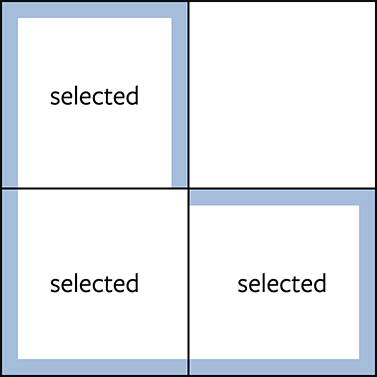
One potential solution is to add a small pseudo-element where the break occurs to “cover the gap.” This logic quickly became somewhat involved because every time a cell is selected or unselected, every affected 2x2 region of cells must be processed and styled accordingly. To efficiently determine which cells need to be updated, each region is evaluated according to a designated anchor cell, which is always the bottom-right cell of the region.
This function below shows the code that finds an edge turn within a region:
public static (Cell, Border)? FindEdgeTurn(Cell anchor) {
    Cell topLeft = anchor.Neighbors.topLeft;
    Cell topRight = anchor.Neighbors.topRight;
    Cell bottomLeft = anchor.Neighbors.topLeft;

    return (topLeft.IsSelected, topRight.IsSelected, bottomLeft.IsSelected, anchor.IsSelected) switch {
        (false, true, true, true) => (anchor, Borders.TopLeftCorner),
        (true, false, true ,true) => (bottomLeft, Borders.TopRightCorner),
        (true, true, false, true) => (topRight, Borders.BottomLeftCorner),
        (true, true, true ,false) => (topLeft, Borders.BottomRightCorner),
        _ => (null, null)
    };
}
Here is the corresponding CSS:
.cell[aria-selected="true"] {
	--clr-cell-bg: rgba(255, 255, 255, 0.5);
	--clr-border: rgba(76, 175, 80, 0.5);

	/* Border shadows */
	box-shadow:
		inset 0 var(--shadow-top, 0) 0 0 var(--clr-border),
		inset var(--shadow-right, 0) 0 0 0 var(--clr-border),
		inset 0 var(--shadow-bottom, 0) 0 0 var(--clr-border),
		inset var(--shadow-left, 0) 0 0 0 var(--clr-border);

	&.top {
		--shadow-top: 8px;
	}

	&.right {
		--shadow-right: -8px;
	}

	&.bottom {
		--shadow-bottom: -8px;
	}

	&.left {
		--shadow-left: 8px;
	}

	/* Corner shadows */
	background-repeat: no-repeat;
	background-size: 8px 8px;
	background-image:
		linear-gradient(
			var(--shadow-tl, transparent),
			var(--shadow-tl, transparent)
		),
		linear-gradient(
			var(--shadow-tr, transparent),
			var(--shadow-tr, transparent)
		),
		linear-gradient(
			var(--shadow-bl, transparent),
			var(--shadow-bl, transparent)
		),
		linear-gradient(
			var(--shadow-br, transparent),
			var(--shadow-br, transparent)
		);

	background-position:
		top left,
		top right,
		bottom left,
		bottom right;

	&.topleftcorner {
		--shadow-tl: var(--clr-border);
	}

	&.toprightcorner {
		--shadow-tr: var(--clr-border);
	}

	&.bottomleftcorner {
		--shadow-bl: var(--clr-border);
	}

	&.bottomrightcorner {
		--shadow-br: var(--clr-border);
	}
}
Drawing the borders included a lot of other code related to checking cell neighbors, and considering the CSS, I ultimately decided to remove the border styling and opt for a minimal cell selection design. If I refactor the app to use the HTML <canvas> element, it will be the perfect opportunity to re-implement the border styling.
I enjoyed coding the cell neighbor relationship logic, and if I ever expand the app in ways that utilize this functionality more, it will be nice to reimplement it.
What I Would Do Differently + Opportunities for Growth
Here are a few additional improvements I would love to make in the future:
- Add support for Sudoku variant puzzles.
- Improve data access by adding an API layer between the WebAssembly project and a MongoDB Atlas cluster.
- Utilize the HTML
<canvas>element to reduce CSS overhead and simplify the border styling and cell highlighting features.
If I were to rebuild this app, I would reconsider the tech stack: C# was a sufficient backend, but I would likely rebuild the entire thing from scratch.
Acknowledgements and Closing Thoughts
I was first exposed to Sudoku when I discovered the Cracking the Cryptic YouTube channel and subsequently solved my first Sudoku. I quickly grew bored with the classic sudoku puzzles and started tackling the variants, some of which took me 6+ hours to beat, and many of which I never completed, even after many hours of trying.
This project is not only a technical effort, but also a love letter to a game I have enjoyed for many years.
I want to emphasize that the code for this project is entirely my own implementation, though it was inspired by my experience playing Sudoku on Sven's Sudoku Pad (featured on Cracking the Cryptic YouTube channel) and, more loosely, on the New York Times Sudoku website.
Thank you for reading and please email me if you have any questions.